Why Integrate AI into Your CRM
The call just ended, and it went well. The deal is clear: send the pricing proposal by Thursday and bring a solutions engineer to the next meeting. As long as those details sit in a transcript or a rep's notes, nothing moves. Someone has to update the deal, someone has to write the follow-up. Integrating AI into the CRM lets the team do that work straight from the conversation, on the deal record where everyone can see it.
Less retyping after calls
AI can pull the specifics out of call transcripts and emails, like the buyer's objections and the agreed next steps, and propose updates for the right CRM fields. The rep reviews them in one place instead of collecting them from their own notes. If a change touches reporting, say the deal stage or the expected close date, the CRM can show the source excerpt next to the proposal. Approving it then means seeing what it is based on.
A follow-up that answers what the buyer asked
A follow-up works when it is about the conversation and not about a template. Say the buyer asked for a security questionnaire before booking a demo. AI can draft an email that acknowledges the request and suggest a task to send the document. The rep checks both while the call is still fresh. The buyer gets a reply that fits, and the team gets a commitment that shows up in the system.
A new owner does not start from zero
A manager joins a deal, or a rep hands it to a colleague. The newcomer needs to know who makes the decision and what the team has already promised. AI can assemble a short briefing from the account's recorded interactions, with links back to the calls and emails it came from. Nobody has to ask the customer to explain everything again.
Pipeline reviews with sharper questions
A deal can sit at the proposal stage long after the buyer said procurement is on hold or mentioned a competing vendor. AI can surface those remarks in the deal record, so the manager stops asking "how's this one going?" and asks "what has to happen before it moves?" If the CRM captures blockers consistently, sales operations can also look across deals and see which ones keep coming back.
What It Means to Integrate AI into a CRM
You give a model access to your customer records so it can work with them. It does one of two things. It reads: summarizes an email thread, drafts a follow-up. Or it writes: fills a field, moves a deal to the next stage.
Those two carry very different risk. A bad summary costs a minute. A bad write can flip a payment status or start an automation, and then it lands in a report someone trusts.
For the wider picture beyond CRM, see AI integration in business.
4 Ways to Integrate AI into a CRM
| Path | Fits when | Watch for |
| Native AI features | The CRM vendor already ships the action you need, for example call summaries or suggested field values | Billing and control. HubSpot AI features run on credits, included monthly credits do not roll over, and you can set a spend limit (HubSpot). You also work inside the vendor's permissions and logging and cannot change how the feature behaves |
| Middleware (Zapier, Make) | The job crosses several apps and follows fixed rules: a new lead arrives, an AI step runs, a task appears in the CRM | The AI step sees whatever you pass into it, so check what each connection can read and write |
| API or MCP server | You want an AI assistant of your choice to read and update CRM data under a user's permissions | Scope, approval and logging are yours to design |
| Custom build | You need your own matching, deduplication, approval flow or data hosting that no vendor tool offers | You maintain it, including model and API changes |
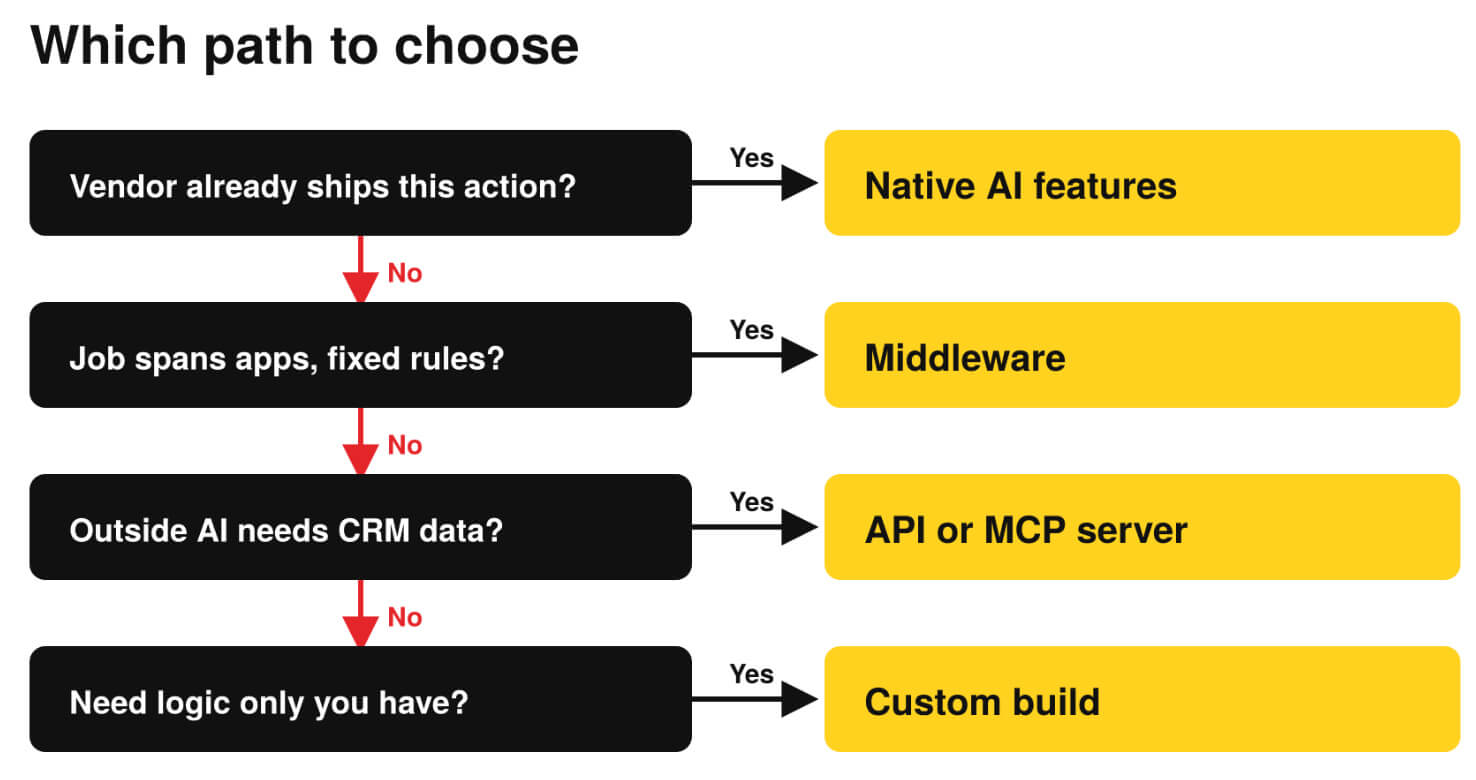
Choosing is simple: go down the list and stop at the first yes. If the vendor already ships this exact action, test the native feature. If the job spans several apps and follows fixed rules, look at middleware. If you want an outside AI assistant to work with CRM data, use the vendor's official API or MCP server. If the logic is one only you have, plan a custom build. You can combine paths later.
Middleware
Zapier MCP gives you an endpoint URL, lets you pick which actions an assistant may run, and connects it to your AI tool. On Zapier's page, one MCP tool call uses two tasks from your plan, and no approval step before an action runs is described, so build one into the flow if you need it (Zapier MCP). Make's July 2024 guide describes the same pattern with OpenAI or Anthropic Claude modules: a CRM event starts a scenario, the AI module produces output, and the result goes to another app (Make). Read it as a description of the pattern, not of today's features.
API or MCP server
MCP (Model Context Protocol) lets an AI tool call functions in another system. For how it differs from retrieval, see RAG vs MCP for AI Agents. HubSpot's remote MCP server became generally available with a changelog date of April 13, 2026, and uses OAuth 2.1 with PKCE (HubSpot changelog). Pipedrive announced a native MCP server on June 30, 2026, and its press release says it is available on all plans and respects user permissions (Pipedrive). Salesforce documents hosted MCP servers with per-user OAuth and PKCE, but when we checked they were labeled beta and aimed at customers with Flex Credits, so confirm the status before you plan around them (Salesforce). Zoho CRM also offers ready-made MCP servers (Zoho).
Community-built MCP servers exist for some CRMs, Pipedrive included. Read the code before you point one at production data.
Step 1: Pick One Use Case and a Success Metric
Pick one task that happens often, that people do by hand today, and where a wrong answer is cheap to catch.
| Use case | Reads or writes | What a wrong output costs | A metric you can measure |
| Summarize account history before a call | Reads | A missed detail | Minutes of prep per call; rep rating on a sample of summaries |
| Draft a follow-up email | Reads, a person sends | A draft the rep rewrites | Edit time; share of drafts sent unchanged |
| Fill deal fields from incoming emails | Writes | A wrong value in a report | Share of records accepted without correction; review time per record |
| Suggest an owner for a new lead | Reads | A lead that waits | Time to first contact |
If your data is messy, begin with a read-only use case. A reading mistake stays on the screen. A writing mistake spreads.
Before anything runs, write down the baseline: how long the task takes now, how often people get it wrong, how many records need rework. A pilot can only be judged against numbers taken beforehand. Set the stopping rule at the same time: what share of corrected outputs makes you pause, and who decides. We leave that threshold to you, because it depends on what a mistake costs in your process.
Skip goals like "improve conversion". Too much outside the AI moves it. Choose a metric the AI's output changes directly.
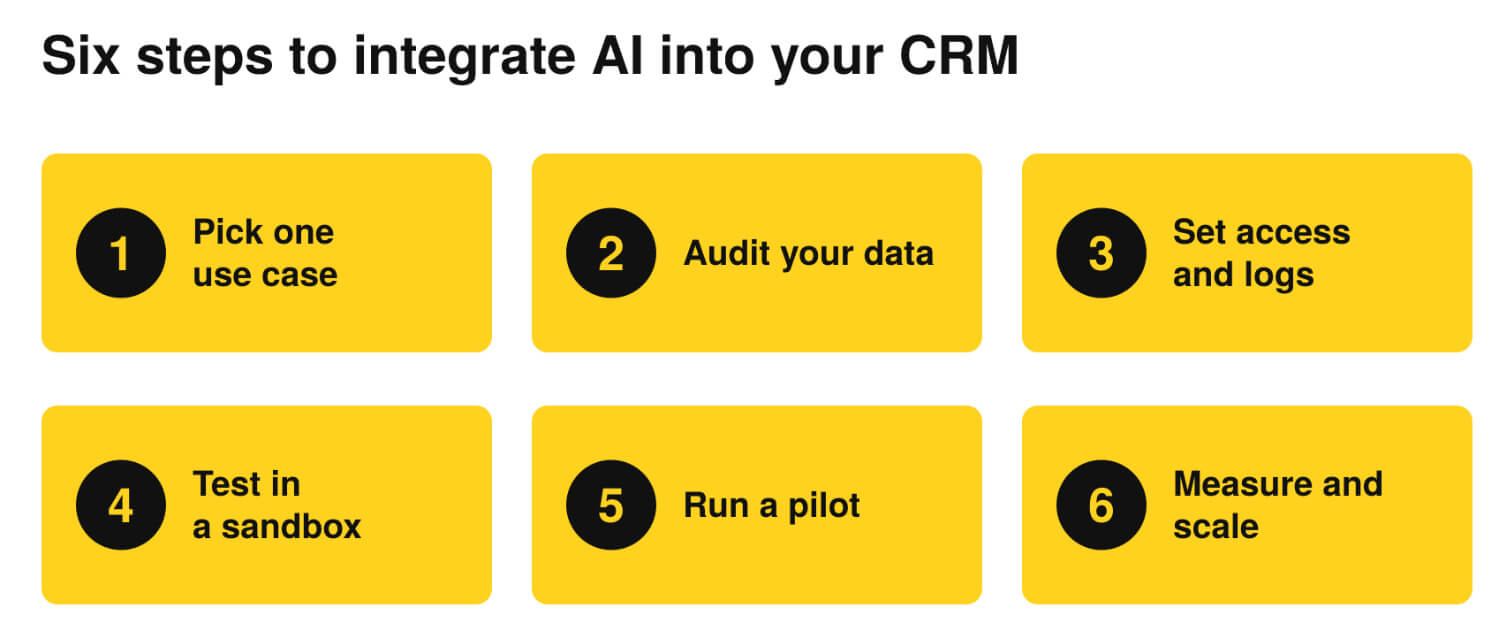
Step 2: Audit Your CRM Data
A model works with what the CRM holds. Feed it wrong data and the output will be wrong, and it will sound sure of itself. Check these before you connect anything:
- Duplicates. Contacts, companies and deals that exist twice will both receive AI-written values, and nobody can tell later which copy is right.
- Required fields. They should be filled on the records the AI will touch. If half the deals have no amount, a model that fills the amount from emails is changing the data, not completing it.
- Stage and status definitions. People should use them the way the process document says. The AI will see the habit, not the rule.
- Field owners. Name a person for every field the AI may write to.
- Sensitive data. Find where personal, payment or health details sit, including free-text notes and email bodies.
- Access rules. Write down who can see what today, since the AI will inherit some version of it.
Calls, emails and other unstructured data
Call and email summaries are a popular first use case, and they raise legal questions that field data does not.
Recording laws differ by U.S. state. Some require consent from one party, others from everyone on the call. HubSpot, for one, turns call recording off by default for contacts whose area codes belong to states that require all-party consent (HubSpot). Published state lists disagree, so we do not reproduce one. Ask your lawyer which rules apply to your callers.
AI transcription adds its own questions about consent and notice, and in some places about voiceprints. A law firm's commentary is a decent place to start (Reed Smith), though it is general commentary and not advice for your case.
If you collect personal data of people in the EU, GDPR Article 13 requires you to tell them the purpose of processing, the legal basis and the recipients. It also covers the existence of automated decision-making in the cases Article 22 describes (Irish Data Protection Commission). Check that your privacy notice still matches what the AI now does with the data. None of this is legal advice.
Step 3: Set Up Security, Access and an Audit Trail
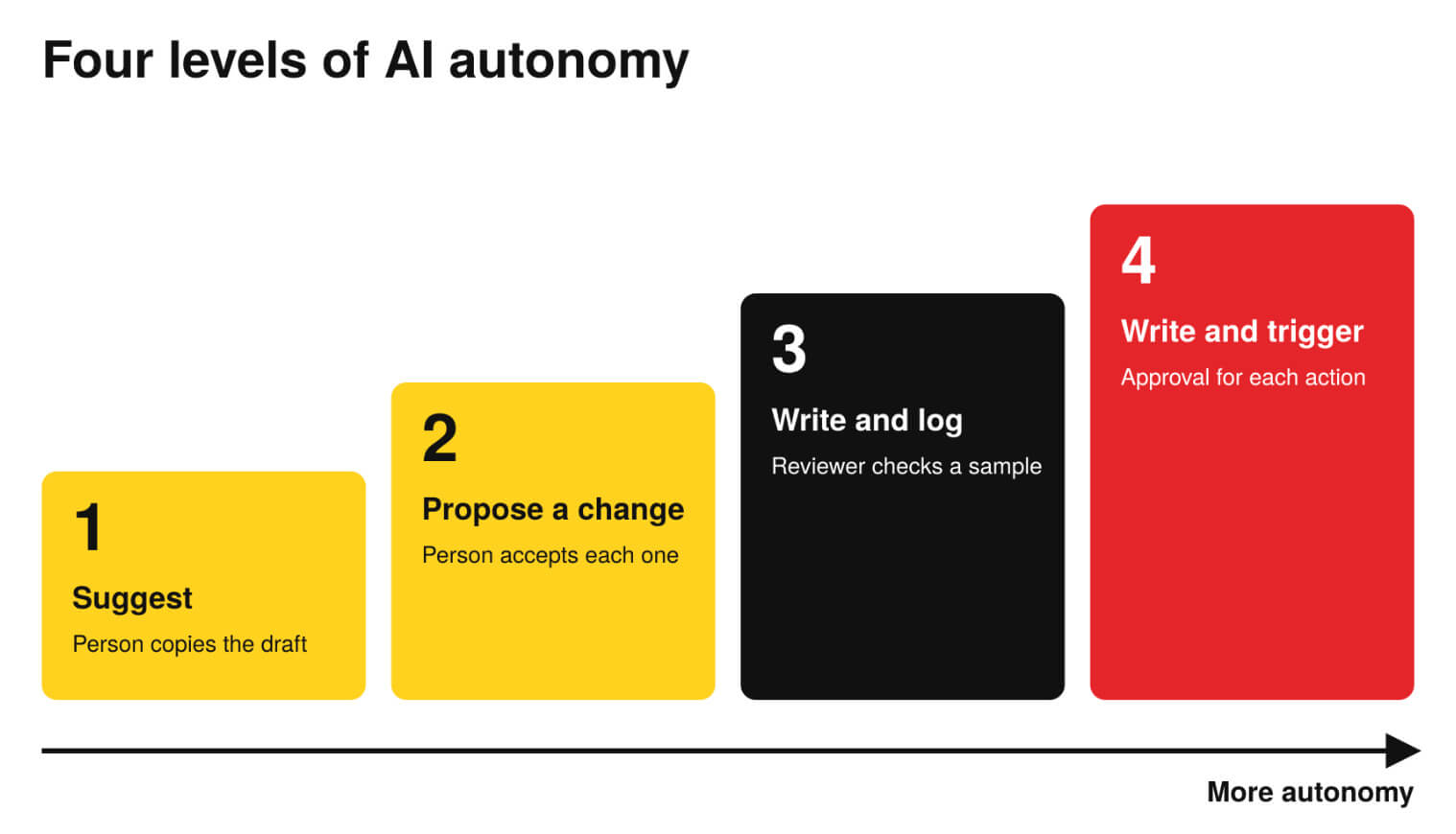
Decide what the AI may do before you build anything. Autonomy comes in levels, and each level needs a different kind of oversight.
| Level | What the AI does | Example | Who approves |
| 1. Suggest | Shows a draft or recommendation that a person copies | A follow-up email draft | The person who uses it |
| 2. Propose a change | Fills a proposed value that stays inactive until accepted | A suggested deal amount | A person, per record |
| 3. Write and log | Writes to the record and logs the change | A note added to a contact | A reviewer checks a sample |
| 4. Write and trigger | Writes, and the write starts other workflows | A stage change that fires an automation | Approval rules set per action |
Picture a customer email that says "we'll pay on Friday". It gives the AI a reason to suggest a reminder task. It gives no reason to mark the invoice as paid. That gap is where we build the decision logic. First, what the source actually confirms and which action that allows. Then, who approves anything beyond it.
We raise autonomy one action at a time, each after a test on historical cases. The test includes processing the same email twice and watching what the write triggers downstream. One action that works has not earned the next one.
Hold off on autonomous writes if deduplication is unreliable or you do not know which workflows a field change starts. Check those dependencies first. Otherwise a correct write can set off a wrong action.
 Yuri MusienkoBusiness developer, Merehead
Permissions and logs
An integration should act with the permissions of the person using it and nothing more. Pipedrive's press release says its MCP server follows user permissions and records actions in change logs (Pipedrive). That is a vendor claim, and the release does not say how long logs are kept or whether an AI-made change is marked as such. Ask. Zoho makes similar statements about Zia respecting CRM roles and logging AI and agent actions, also on marketing pages (Zoho). Salesforce documents per-user OAuth with PKCE for its hosted MCP servers (Salesforce).
Where the data goes
Find out which model processes the data and what happens to it afterward. Salesforce describes the Einstein Trust Layer as including data masking, an audit trail and zero data retention with its LLM partners (Salesforce). Trailhead adds that masking is currently off for agents and available for built-in features, so read the page for the feature you plan to use (Trailhead). In Zoho CRM, Smart Prompt can run on Zia's own model, Cohere or OpenAI, and the OpenAI option needs your own API key (Zoho).
California approved regulations on automated decision-making technology in September 2025 (CPPA). We could not confirm when the requirements start, and whether a CRM suggestion falls under the definition depends on how you use it. Put it on your lawyer's list. If you want engineers and a lawyer to review these controls together, see AI governance consulting.
Step 4: Build and Test in a Sandbox
A sandbox is a copy of your CRM where mistakes cost nothing. What vendors offer varies a lot, and that decides how realistic your test can be.
| CRM | Sandbox | The catch |
| HubSpot | Included with Enterprise editions, one per account, more cost extra (HubSpot). Integrations with production do not connect automatically (HubSpot KB) | Lower tiers have no sandbox |
| Salesforce | Four types: Developer, Developer Pro, Partial Copy and Full Copy (Salesforce) | Developer holds no data. Testing on real deals needs Partial or Full Copy, which puts personal data in the sandbox |
| Pipedrive | A developer sandbox: a separate account, five seats by default, available on request (Pipedrive) | It is built for app developers and is not a copy of your account. You export and import data yourself |
| Zoho CRM | Sandbox with or without data. The full-data version is limited to Ultimate and CRM Plus, up to 10 GB, and attachments are not copied (Zoho) | The full-data sandbox rolled out in phases, so check your region |
If your plan has no sandbox, create a separate test account and load a small set of exported records with personal data removed or masked.
Test against cases where you already know the right answer: historical records that people processed by hand.
- Define "correct" in advance. For a payment record it might mean that amount, date, counterparty and currency all match the manual entry.
- Run the AI on the historical set and compare record by record.
- Process the same input twice. This is how you find duplicate-creation problems before launch.
- Check what each write triggers: dependent workflows, notifications, changes in reports.
- Log how long a person needs to review and fix each result.
No historical data? Then collect examples first. Let the AI propose values, have a person check each proposal by hand, and write nothing to the CRM until you have enough cases to test against. Custom workflows do not rule out an integration, but they need their own regression tests.
Step 5: Run a Pilot with One Team
The sandbox test tells you the integration works. Whether people can work with it is a different question, and the pilot answers it.
Pick one team whose manager wants this and whose people will say so when the output is wrong. At first, run the AI beside the manual process: people still do the task, and the AI's result is compared with theirs. You collect real corrections without real damage.
Keep autonomy as low as the use case allows. A bad suggestion can be ignored. A bad write has to be found first.
Go through the corrections every week. Patterns show up fast: one field keeps coming out wrong, or one kind of email confuses the model. Fix those before you widen the pilot.
Step 6: Measure Results and Scale
Compare the pilot with the baseline from Step 1, using targets you set before it began.
| Measure | How to take it | What it tells you |
| Share of outputs accepted without edits | Count accepted, edited and rejected outputs per week | Whether the model is good enough for this task |
| Time to review and correct | Time people spend checking and fixing each output | Whether any time is actually saved |
| Task time against baseline | The Step 1 baseline against the pilot | The gross gain, before review time is subtracted |
| Errors that reached a report or a customer | Incidents found after the fact | Whether review catches what it should |
| Adoption | Share of eligible tasks where people used the AI | Whether the team trusts the tool |
| Cost per accepted output | Usage charges and licenses divided by accepted outputs | What the result costs, not what the plan costs |
Review time decides whether this pays off. Filling a field in seconds saves nothing if a person then spends minutes checking it. Put review and correction time in the scorecard right next to the speed of the fill.
You can scale in two directions. One is the audience: move from one team to the next once the pilot hits its targets. The other is autonomy: go from suggesting to writing, one action at a time, each with its own test on historical cases. A team can be ready for the first and not for the second.
What Affects Cost and Timeline
We cannot give one figure without knowing your CRM and the use case. These are the drivers:
| Driver | What moves it |
| AI usage | How the vendor charges, and how often the AI runs |
| Plan tier | Which AI features, sandboxes and API access your edition includes |
| Integration work | A native setting, a middleware flow, an MCP connection or custom code |
| Data cleanup | Duplicates, empty required fields and inconsistent stages from Step 2 |
| Testing and review | The number of test cycles and the time people spend checking output |
| Monitoring | Someone has to watch accuracy and usage after launch |
Vendors bill AI usage in different ways. HubSpot uses credits: included monthly credits do not roll over, and you can set a spend limit (HubSpot). Salesforce prices Agentforce through Flex Credits, charged per action and per conversation, and the user license also requires Flex Credits. Prices differ between its regional pages, so check the one for your country (Salesforce). Its hosted MCP servers are intended for customers with Flex Credits, so even the way you connect can depend on the billing model (Salesforce). Zoho says creating Zia agents is free and you pay for the LLM tokens they use (Zoho). That is a vendor statement, so confirm it against your own usage. With middleware, Zapier counts each MCP tool call as two tasks from your plan (Zapier).
In every case you pay for how much the model does. An integration that runs on every incoming email costs more than one that runs when someone clicks a button. For agent builds, AI Agent Development Cost in 2026 breaks the estimate down by phase and covers running costs after launch.
Timeline follows the same logic. Cleaning data, testing what each write triggers and running the pilot take the time, and a failed test sends you back a step.
Common Mistakes
Here is what tends to happen when one of the steps above gets skipped.
| What you see | Likely cause | What to do |
| Duplicate records after launch | The same email was processed twice, or two systems created the same record | Test reprocessing in the sandbox and add a matching rule before the AI writes |
| A payment or deal status changed from a vague message | The AI was allowed to write a status from a source that does not confirm it | Limit status fields to suggestions and define what each source can confirm |
| Time saved on entry vanishes in review | Review and correction time was never measured | Put it in the scorecard from the first week |
| Reports shifted after the AI started writing | A write triggered dependent workflows nobody tested | Test every workflow the write can start |
| Customer data went to a model nobody approved | A default setting was left alone | Check which model each AI feature uses and where it runs |
Build Custom or Buy?
When the use case is standard and the vendor's permissions and logging are good enough for you, use what the CRM already has. It is faster, and the vendor maintains it.
Build when the logic is yours: matching records across several systems, deduplication rules no vendor tool offers, approval flows tied to your process, or a model hosted where you decide. You get control, and you take on the upkeep. That means watching accuracy and fixing things when a model, an API or a vendor changes underneath you. Mixing works too: a native feature for the standard part and custom code for the one step it cannot do.
Merehead is an AI development company and has developed AI systems since 2023. If you are not sure a use case is ready, we can check it before you build. For $2,000 and 1 to 2 weeks, we review one AI scenario in one CRM and hand you a dependency map, a test protocol, a scorecard and a pilot estimate with a recommendation on whether to run it. To start, contact our team.
FAQ
Native AI features and middleware tools such as Zapier or Make can often be set up by someone with admin rights. The parts that are not code still need work: the data audit, access rules and testing. A custom build needs developers.
It depends on how clean your data is, how many workflows a write can trigger, and how many test cycles the pilot needs. Plan for the audit, the sandbox test and the pilot, not only the setup.
It can be, if the AI acts with a user's permissions and no more, its actions are logged, and you know which model processes the data and where. Step 3 lists what to ask each vendor.
Not at the start. Begin with suggestions and allow writes one action at a time, after each passes a test on historical cases.
Only if you want an external AI assistant to work with CRM data. Native AI features and most middleware flows do not require one.