
What Is AI Integration in Business
AI integration means connecting AI to the systems and workflows a company already uses. A churn model running inside your CRM is integrated. So is a model that reads invoices in your ERP. A chatbot in a browser tab that someone pastes data into is a tool.
The difference is the data flow. An isolated tool needs a person to carry information in and out, so you get a one-off analysis. An integrated system pulls data from your software automatically, writes results back and reacts to events as they happen. That is what turns periodic reports into real-time decisions. Typical examples are machine learning models built into CRM, ERP and supply chain platforms.
In this context, AI means software that learns patterns from data and uses them to predict, classify or generate.
How AI Integration Works in Business Operations
Most integrations combine a few building blocks.
- Machine learning models learn from historical data, then predict outcomes or automate scoring and classification.
- Natural language processing handles text: chatbots, document parsing and internal search.
- Generative AI drafts content and summarizes reports inside the tools employees already use.
- Predictive analytics sends live signals to operations, marketing and risk teams.
APIs connect all of this to your existing software. A model, hosted by a provider or on your own infrastructure, exposes an endpoint. Your application sends it data and gets a result back. Nothing needs rebuilding, which is why a first integration can take weeks or a few months instead of a full replatforming.
A legacy system without a usable API changes the picture. You need middleware or a data export in between, and that is usually where schedule and budget start to grow.
Strategy 1: Start with a High-Impact, Narrow Use Case
A pilot in one department shows whether AI pays off before you commit enterprise-wide budget. Good candidates are high-volume, repetitive tasks, such as invoice processing or support ticket routing. Results show up within weeks, and you can count them.
A narrow scope also limits risk. Less data is exposed, the compliance review is shorter, and a small team can follow what the system does.
Once one team has a working pilot, other departments start asking for the same thing.
Strategy 2: Prepare Your Data Infrastructure Before Deployment
AI models give unreliable answers when the data behind them is incomplete, scattered across systems or out of date. Fixing that after launch costs more than doing it first.
Start with an audit. Check how consistent the records are, how accurate the labels are and which regulations apply to each dataset. Write a data governance policy that names an owner for every source and sets access rules and retention periods. Then build pipelines that feed the model clean, current inputs in production, not a one-time export.
On an assistant we built for a regional insurance administrator, the model was not the hard part. The procedures it needed were spread across duplicate checklists, files nobody owned and generic documents with state-specific rules buried inside. We inventoried the content, settled conflicts with the department owners and retired outdated files before anything was indexed, and every document that went live got an owner and a review date.
Strategy 3: Align AI Integration with Specific Business Goals
Tie every AI tool to one number the business already tracks: cost per ticket, days to invoice, conversion rate. Projects built around a technology tend to get judged on the demo.
Bring department heads in early, so the system goes after a real operational problem and not a theoretical one. Agree on the success metrics before launch, too. Set them afterward and every underwhelming result finds an explanation.
Few companies do. In McKinsey's 2025 survey on generative AI, fewer than one in five organizations tracked KPIs for their solutions. Yet each of the 12 adoption and scaling practices the survey tested, KPI tracking among them, correlated with higher EBIT impact.
At that carrier we measured before we built anything. The starting numbers came from a month of load data: 5 to 7 minutes to enter a rate confirmation, 3 to 5 days from delivery to invoice. Four weeks later the same measurements showed about 30 seconds of review per confirmation, one day to invoice and about 22 dispatcher hours a week back across the three dispatchers. We had agreed up front to stop if the numbers didn't move.
Strategy 4: Manage Change and Build Team Readiness
Employee resistance can stall a technically sound project. In WalkMe's 2026 survey of 3,750 executives and employees, 54% of workers had bypassed their company's AI tools in the previous 30 days. Gallup's February 2026 study of U.S. employees points to two things that move people toward using AI: support from their manager and tools that fit the way they already work.
What helps in practice: tell people plainly that AI takes over tasks, not roles, and make sure the plan backs that up. Train them on the specific tool they will use, not on AI in general. Name one AI champion per team who answers questions and passes problems up. And let frontline staff help choose the tool, since they know where the current process hurts.
Strategy 5: Monitor, Optimize, and Scale Continuously
A model that works at launch may not work a year later. Real-world data changes, and accuracy drifts with it. Schedule retraining and audits, and track model accuracy, latency and the business KPI the system was built to move.
Users catch what dashboards miss: odd errors, edge cases, questions nobody planned for. Make it easy to flag a wrong answer, and review the flags on a schedule.
Once the core metrics hold, expand the use case to other business units.
Key Benefits of AI Integration Across Business Functions
- Automating repetitive workflows lowers operating costs and frees people for work that needs judgment.
- Personalization based on customer context can improve retention at a scale manual work cannot reach.
- Predictive analytics can flag supply chain problems before they turn into delays.
- AI-based security monitoring can spot unusual behavior that fixed rules miss, which shortens response time.
- Decision cycles get shorter. A team that sees today's data today does not wait for the monthly report.
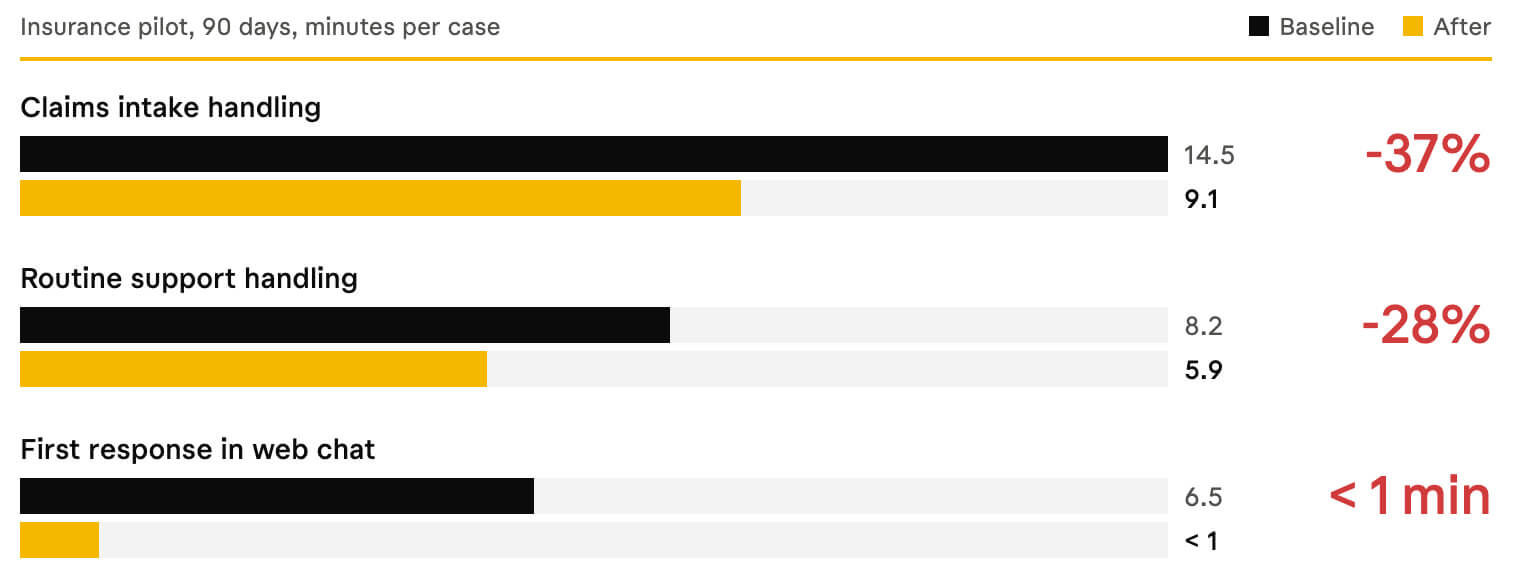
The insurance pilot mentioned earlier gives measured numbers. Twelve claims handlers and 18 service representatives used the assistant for 90 days, with staff reviewing its outputs, and the results were compared with a baseline taken before rollout. Claims intake handling time fell from 14.5 to 9.1 minutes per eligible notification, a 37% drop. Routine support handling went from 8.2 to 5.9 minutes (28%). First response in web chat for approved, in-scope questions dropped from 6.5 minutes to under one. Extracted claim fields reached 92% accuracy on the pilot evaluation set before human verification. Coverage decisions stayed with people. Your numbers will depend on ticket mix, source quality and how many conversations can be automated at all.
Common AI Integration Challenges and How to Address Them
| Challenge | Why it happens | How to address it |
| Data privacy and regulation | Prompts, logs and training sets often carry personal data, and once they do, GDPR applies | Draw a map of where the data goes before launch and ask legal to read it. A narrow pilot keeps the exposure small. |
| Model bias | If some groups are thin in the training data, the model serves them worse | Test results by group before launch, then test again on live data, which can look different from the test set. |
| Legacy systems | An old system with no clean API can only talk to AI through middleware or manual exports | Look for APIs during the data audit and give connector work its own budget line, so it doesn't hide inside "integration". |
| Budget overruns | The pilot grows a little at a time until it is a different project | Write the pilot scope down and treat every expansion as a separate funding decision. |
| Hallucinations | Generative models sound just as confident when they are wrong | Tie answers to your own documents, show the source and keep a person approving anything high-stakes, as in the carrier example above. |
AI Integration Use Cases by Business Function
| Function | AI use case | What it automates |
| Customer support | A chatbot on first-line questions | Routine questions get an answer without an agent. Anything harder goes to a person. |
| Marketing | Segmentation, copy drafts and campaign tuning | Sorting customers into groups, writing first drafts and adjusting campaigns as results arrive |
| Finance | Invoice matching, fraud flags and cash flow forecasts | Pairing invoices with orders, pointing out odd transactions and projecting cash positions |
| HR | Candidate screening, job description checks and attrition prediction | First-pass screening of applications, wording checks and early signs that someone may leave |
HR needs extra care. In the EU, the AI Act classifies AI used for recruitment, candidate screening and ranking as high-risk, and GDPR Article 22 restricts decisions based solely on automated processing. A person should review every screening outcome and be able to overrule it.
How Much Does AI Integration Cost?
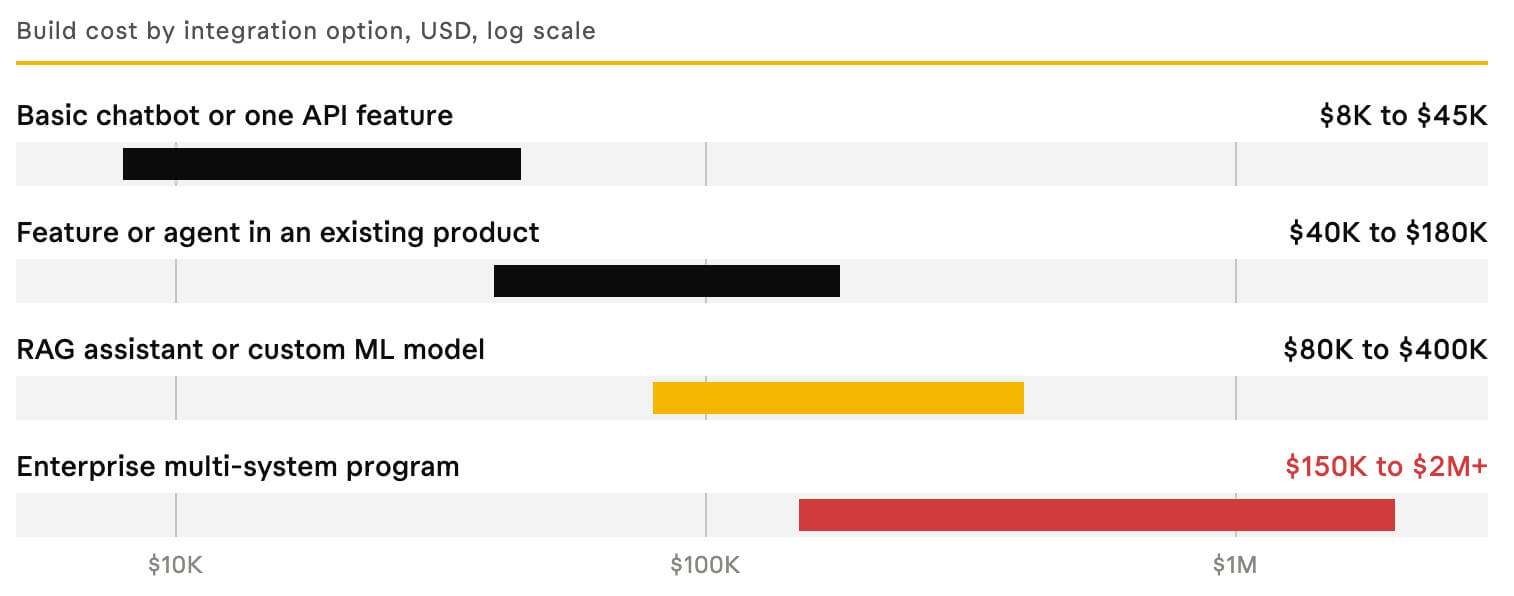
The phrase "AI integration" covers a monthly subscription and a multi-system enterprise program alike, so prices span several orders of magnitude. The table below groups published 2026 cost guides from AI development firms by integration option. The figures are market ranges for build cost in US dollars, not Merehead quotes, and vendors define scope differently, so treat each range as a rough guide.
| Integration option | Typical cost | What you get |
| Ready-made AI tool or copilot | $21 to $30 per user per month | AI inside software you already license, with no custom integration. Microsoft 365 Copilot, for example, is listed at $21 per user per month for organizations of up to 300 users and $30 for larger ones, so 50 users cost about $1,050 to $1,500 a month |
| Basic chatbot or one feature through a model API | $8K to $45K | A chatbot or a single AI feature on one modern, API-ready system |
| AI feature or workflow agent inside an existing product or department | $40K to $180K | A production feature or agent connected to several tools and workflows |
| Assistant on your company data (RAG or generative AI) or a custom ML model | $80K to $400K | Retrieval over your documents with access control, or a model trained on your data, with evaluation and deployment |
| Enterprise multi-system program | $150K to $2M+ | Several systems connected, with governance, security and rollout across business units |
Adjacent options overlap because scope sets the price, not the label. Published timelines run from 4 to 8 weeks for a proof of concept and 2 to 4 months for a production AI feature, up to 3 to 8 months for custom ML and 4 to 12 months for a generative AI or agent platform.
The model is rarely the biggest line. One guide puts integration and API engineering at 40 to 60% of build cost and data preparation at another 25 to 35%. Each extra system you connect adds roughly $5,000 to $20,000, and a legacy system without a modern API can add $30,000 to $200,000 for custom middleware. Regulated industries pay a compliance premium, and published estimates of it range from 15% to 60%.
Then there is the running cost. After launch, plan for maintenance and retraining at roughly 10 to 25% of the build cost per year, plus usage fees that grow with traffic. One guide estimates a customer support assistant handling 100,000 queries a day at about $9,000 a month on a lower-priced model and about $19,800 on a premium one. And the jump from proof of concept to production typically costs three to five times as much as the proof of concept itself.
When you compare quotes, ask for one-time and recurring costs on separate lines and for the list of systems and data sources each quote assumes. For more detail on specific project types, see our guides to AI agent development cost and how to create an AI app.
How to Choose the Right AI Tools and Partners for Your Business
Compare vendors on these points before you sign anything.
- Check the vendor's security certifications and compliance record.
- Prefer platforms with native integrations for your ERP, CRM or cloud environment. Custom connectors are where cost and delay pile up.
- Compare total cost of ownership: licensing, customization, training, support and the recurring costs listed above.
- Ask for case studies from your own industry, with measured results and a description of how they were measured.
- Confirm that your team can explain and audit the model's outputs.
If you want to scope a first AI integration, send us the process you have in mind and the systems it touches.
FAQ
Pick one repetitive process with a measurable result, check that the data behind it is complete and has an owner, and set the KPI before launch. Prepare the people who will use it, connect the model to your existing software through APIs and monitor accuracy and business impact after go-live.
Spend a day with the people who do the work and list where their time goes. Choose a process that is high-volume and mostly documents or lookups, measure how long it takes and what it costs today, and run a pilot of a few weeks against those numbers.
Models learn patterns from historical data, and APIs connect them to your CRM, ERP, helpdesk or other software. The system receives data and returns a prediction, a classification or a draft, and a person or another system acts on it. Natural language processing handles text such as emails and documents, and generative AI adds drafting and summarizing.