
To build a multi-agent AI system, first confirm that a single agent with tools can't handle the task. Then choose an orchestration pattern (most often an orchestrator that delegates to specialized worker agents), give each agent one role with its own tools and instructions, and define how agents share state and hand off work. Pick a framework that supports that pattern, ship a minimal two- or three-agent version, and add guardrails, evaluation and tracing before you scale. Multi-agent systems burn more tokens and are harder to debug than a single agent, so split only where specialization clearly pays for itself.
How to Build a Multi-Agent AI System: 7 Steps at a Glance
The build order matters more than the framework. Start with five agents and a clever router, and you'll spend most of your time debugging coordination instead of the actual task.
- Validate the need. Prove that one agent with good tools falls short before you add more. See Do You Actually Need Multiple Agents?
- Choose an architecture pattern: orchestrator-worker, handoffs, or a fixed pipeline.
- Design roles, tools and instructions so each agent has one job and a scoped toolset.
- Define state and communication: what agents share, what they pass to each other, and how they reach tools.
- Pick a framework that matches the pattern you chose, not the other way around.
- Build a minimal version with two or three agents on a predictable flow and get it passing a small test set.
- Add reliability (guardrails, loop limits, evaluation, tracing, human approval), then scale the number of agents or the autonomy of routing.
Most tutorials skip steps 1 and 7.
Do You Actually Need Multiple Agents?
Often you don't. OpenAI's practical guide to building agents, written from customer deployments, says it directly: "Our general recommendation is to maximize a single agent's capabilities first". A single agent that gains tools one at a time is easier to evaluate and cheaper to run.
Splitting starts to make sense when one agent's prompt turns into a maze of conditional branches, or when its tools begin to overlap. OpenAI notes that the problem "isn't solely the number of tools, but their similarity or overlap". An agent choosing between search_orders and lookup_order_history will pick wrong more often than an agent with twenty clearly distinct tools.
Anthropic's engineering team adds a second reason in its write-up on how it built Claude's Research feature: parallel work. Subagents explore different parts of a question at the same time, each in its own context window, and hand back condensed results. The same post is candid about where this fails. Domains where every agent needs the same context, or where agents depend heavily on each other, are "not a good fit for multi-agent systems today", and most coding tasks have fewer truly parallel subtasks than research does.
| Stay with a single agent if | Split into multiple agents if |
| The task is mostly sequential and each step needs the full context | Subtasks are independent and can run in parallel |
| Tools are few and clearly distinct | Tools overlap and the agent keeps choosing the wrong one |
| One prompt can describe the job without heavy branching | The prompt is full of "if the user asks X, do Y" logic |
| All steps need the same permissions | Some steps need access (payments, writes, PII) that others must not have |
| Latency and token cost are tight constraints | Quality gains justify several times the token spend |
If most of your answers land in the left column, stop here and improve the single agent. The rest of this guide assumes at least two rows clearly point right.
Choose an Architecture Pattern
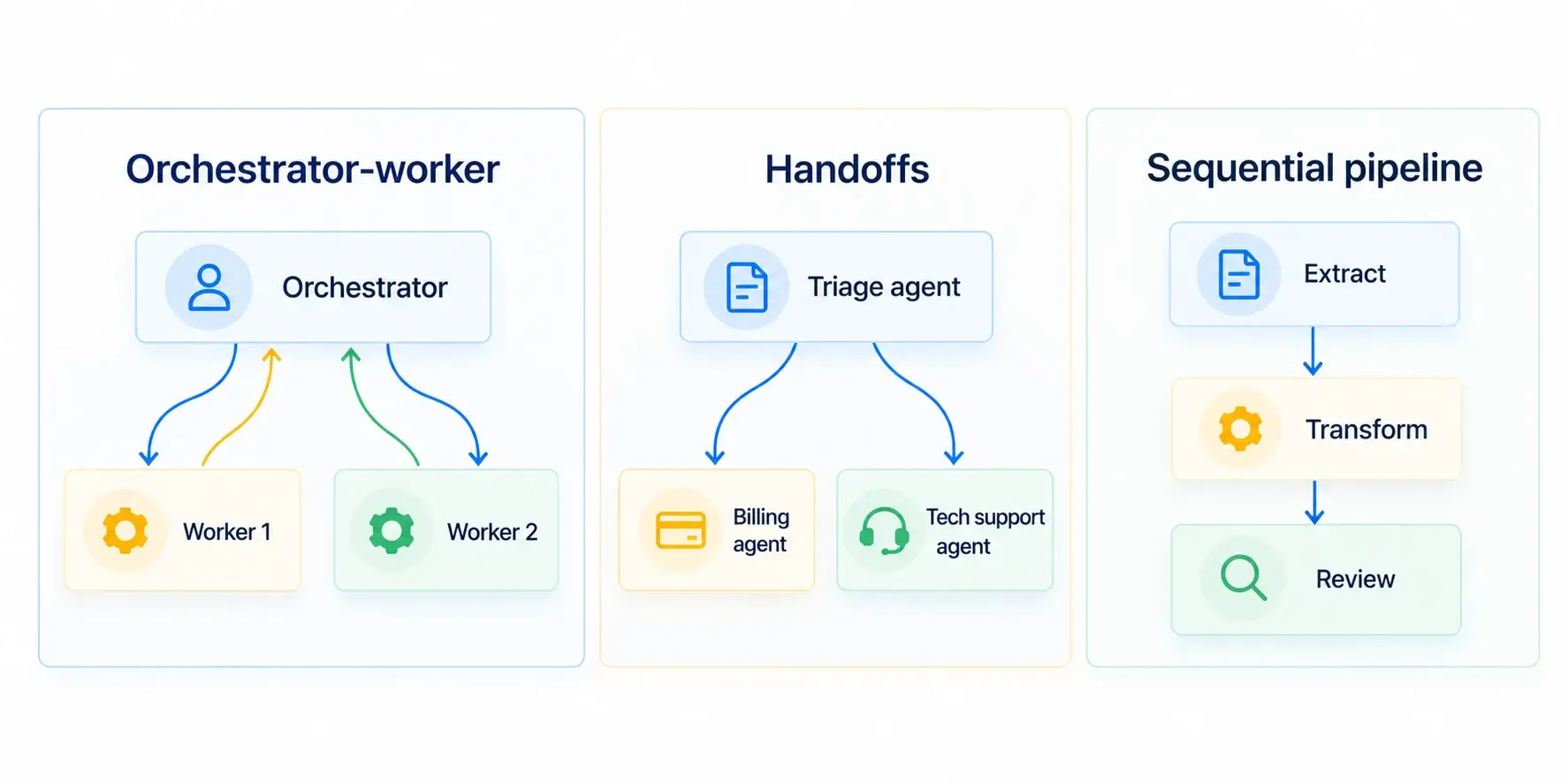
Default to an orchestrator-worker pattern. Use handoffs when the right specialist should take over the conversation entirely, and use a sequential pipeline when the steps are known in advance. Almost every production multi-agent architecture is one of these three or a nesting of them.
Orchestrator-worker (manager) pattern
A lead agent reads the request, breaks it into subtasks, calls specialized agents as if they were tools, and combines their results. OpenAI calls this the manager pattern: "a central 'manager' agent coordinates multiple specialized agents via tool calls". Anthropic's Research system works this way, with a lead agent spawning subagents that search in parallel.
It fits open-ended work where you can't predict the steps: research, analysis, multi-source reporting. The orchestrator keeps the global picture and is the only agent that talks to the user.
The cost is that the orchestrator becomes a bottleneck. Anthropic notes that its lead agents run subagents synchronously, waiting for each batch to finish, so one slow subagent holds up the whole run. Orchestrators also tend to over-delegate, spawning workers for questions they could answer in one tool call.
Handoff (decentralized) pattern
Agents act as peers and pass control to whichever specialist fits next. OpenAI describes it as agents "handing off tasks to one another based on their specializations". A triage agent routes a customer to a billing agent, which may hand off to a refunds agent.
This works well for conversational flows where the specialist should own the rest of the interaction. The risk is losing the global view. No single agent knows the full history unless you pass it along, and a bad routing decision early on is hard to recover from.
Sequential pipeline
Agents run in a fixed order and each one's output feeds the next. There is no routing decision at all; the order lives in your code. Document processing, content generation with a review step, and ETL-style workflows fit here.
Pipelines are the easiest to test and debug. They are also rigid. Once requests start needing different paths, you either add conditional edges (and drift toward orchestration) or end up maintaining several pipelines.
| Pattern | Who decides the next step | Best for | Main risk |
| Orchestrator-worker | Lead agent, at runtime | Open-ended research, analysis, complex tasks | Bottleneck at the orchestrator, over-delegation |
| Handoffs | Current agent, at runtime | Triage, customer support, conversational routing | Lost context, hard-to-trace routing errors |
| Sequential pipeline | Your code, at design time | Predictable multi-step workflows | Rigid when requests vary |
Hierarchical systems, where an orchestrator delegates to sub-orchestrators, are a nesting of the first pattern. Reach for them only when a single orchestrator's context can no longer hold the plan.
Design Agent Roles, Tools and Instructions
Give each agent one responsibility, only the tools that responsibility needs, and a delegation brief that states the objective, expected output, allowed tools and stop condition. Most coordination bugs trace back to vague roles, not to the framework.
One job per agent
If you can't describe an agent's job in one sentence without "and", it is probably two agents, or it should stay inside a single agent. "Find and summarize sources" is fine. "Find sources, write the report and check it" is three jobs with different failure modes.
Scope tools per agent
Treat tool access like permissions. A reviewer that only reads drafts should not have a tool that publishes them. Narrow toolsets also improve tool selection, since the model has fewer near-duplicates to confuse.
Keep deterministic work out of the model entirely. In an AI trading-signal system we built, the technical-analysis agent never calculates RSI or MACD itself: Python code computes the indicators and hands the agent finished numbers to interpret. Each of the system's specialized agents returns a structured confidence score with its reasoning, which is what lets the final agent compare and weight their outputs instead of reconciling free text.
Write clear delegation briefs
The orchestrator's instructions to a worker are a prompt, and a short one is usually a bad one. Anthropic found that early versions of its lead agent sent instructions like "research the semiconductor shortage", and subagents either misread the task or ran the same searches as each other. Their fix was to require four things in every brief: "an objective, an output format, guidance on the tools and sources to use, and clear task boundaries".
They also had to teach the orchestrator to scale effort to the request. In Anthropic's guidelines, simple fact-finding needs one agent with 3 to 10 tool calls, while complex research might justify more than 10 subagents with divided responsibilities. Without that rule, the system spent heavily on easy questions.
Here is one example role set for a research-and-report system:
| Role | Input | Tools | Output | Stop condition |
| Orchestrator | User request | Delegation (calls other agents), final synthesis | Plan, final answer | All subtasks returned or budget hit |
| Researcher | One subtask brief | Web search, internal docs search | Findings with source links | Brief's question answered or N tool calls used |
| Writer | Findings, target format | None (text only) | Draft | Draft covers every finding |
| Reviewer | Draft, findings, rubric | None (text only) | Pass/fail plus specific fixes | Verdict returned in the required schema |
The writer and reviewer have no tools on purpose. Nothing they do needs external access, so giving them some would only add ways to fail.
Define How Agents Share State and Communicate
Keep task state in one structured store, pass compact results between agents instead of full transcripts, use MCP to give agents standard access to tools and data, and add A2A only when agents run as separate services.
Shared state vs message passing
There are two basic options. With shared state, every agent reads from and writes to one structured object (a graph state, a database record, a typed dictionary). With message passing, agents send each other results directly.
Shared state is easier to debug because you can inspect the whole task at any point and checkpoint it. It works best when agents run inside one process or one graph. Message passing suits loosely coupled agents and services, but you have to log the messages yourself to reconstruct what happened.
Either way, define the state as a schema rather than free text:
from typing import TypedDict
class ResearchState(TypedDict):
task: str # original request
subtasks: list[str] # written by the orchestrator
findings: list[dict] # each: {"claim": str, "source": str}
draft: str # written by the writer
verdict: str # "approve" or "revise", written by the reviewer
revisions: int # loop counter, used for hard stops
Pass condensed outputs, not raw history. A researcher should return findings with sources, not its 40-message search transcript. This keeps each agent's context small, which is the reason you split agents in the first place.
Standardize tool access with MCP
The Model Context Protocol (MCP) is an open standard for connecting agents to tools and data sources. Instead of writing a custom adapter for every database or API in every framework, you expose each resource once as an MCP server, and any MCP-compatible agent can use it. Anthropic introduced MCP and in December 2025 donated it to the Agentic AI Foundation under the Linux Foundation.
For a multi-agent system, MCP helps most when several agents, possibly built on different frameworks, need the same resources. It does not decide which agent should use which tool. That is still your role design. For how MCP compares with retrieval for giving agents context, see our RAG vs MCP architecture guide.
Connect agents across services with A2A
The Agent2Agent protocol (A2A) covers a different layer: how independent agents talk to each other over the network. Google introduced it in April 2025 and moved it to the Linux Foundation in June 2025; in August 2026 it was reported to be joining MCP under the Agentic AI Foundation. Google's multi-agent Codelab uses it to connect agents deployed as separate services.
You need A2A when agents are owned by different teams, run as separate deployments, or are built on different frameworks. If all your agents live in one codebase and one process, a shared state object is simpler and A2A adds network hops for no benefit.
Pick a Framework
Choose a framework by the orchestration model you need, how much control you want over the flow, and the ecosystem you already run on. Popularity is a weak signal. Decide on the pattern first (previous sections), then check each candidate against these questions:
- Does it express your pattern natively (graph, role-based crew, handoffs, workflow agents)?
- Can it persist state and pause for human approval?
- Does it ship tracing, or integrate with the observability tool you use?
- Is it tied to one model provider or cloud?
- Which languages does your team need (Python, TypeScript, .NET)?
| Framework | Orchestration model | Strengths | Watch out for | Best fit |
| LangGraph | Explicit graph: nodes, edges and shared typed state | Fine-grained control, checkpointing, interrupts for human-in-the-loop | More code to wire flows by hand | Teams that want full control over routing and state |
| CrewAI | Role-based agents (role, goal, backstory) in crews; Flows for event-driven orchestration | Fast to model team-like collaboration | Role abstraction can hide control flow details | Role-oriented workflows, quick prototypes |
| OpenAI Agents SDK | Agents with handoffs or agents-as-tools | Lightweight; built-in guardrails, sessions, tracing; provider-agnostic per its README | Fewer workflow primitives than graph frameworks | Handoff and manager patterns with minimal boilerplate |
| Google ADK | LLM agents with sub-agents plus workflow agents (sequential, parallel, loop) | Workflow agents map directly to patterns; A2A and Google Cloud deployment paths | Strongest fit inside the Google Cloud ecosystem | Teams on Google Cloud, multi-service agents |
| Microsoft Agent Framework | Sequential, concurrent, handoff and group chat orchestrations | Successor to AutoGen and Semantic Kernel; .NET and Python; 1.0 released April 2026 | Migration work for existing AutoGen or Semantic Kernel code | .NET shops, Azure-centric teams |
| Custom code | Your own loop and state store | No abstraction overhead, nothing to fight | You build tracing, retries and persistence yourself | Simple pipelines, or teams with very specific needs |
Framework features change quickly. The details above reflect each project's documentation as of October 2026; check the current docs before you commit.
A practical tip: prototype the same small flow in your top two candidates. A day spent on that usually settles the choice faster than reading comparisons.
Build a Minimal Version First
Start with two or three agents on a fixed flow, get it passing a small test set, and only then add dynamic routing or more agents. OpenAI notes that customers "typically achieve greater success with an incremental approach", and its guide recommends setting up evals for a performance baseline early, prototyping with the most capable model, then testing smaller models where accuracy allows.
A sensible first version:
- Write 15 to 30 real test requests and the result you would accept for each.
- Build the flow with fixed routing in code. Here, the graph itself plays the orchestrator.
- Add a hard cap on loops and a cap on tool calls per agent.
- Run the test set, read the traces, fix the worst failure, repeat.
- Only when the fixed flow fails because requests need different paths, replace the routing function with an LLM-based orchestrator.
The example below is a researcher, writer and reviewer in LangGraph, with a revision loop and a hard stop. The model call is stubbed so the graph runs without an API key; we ran it with LangGraph 1.2.17. Replace call_llm with your model client.
from typing import TypedDict

from langgraph.graph import StateGraph, START, END
MAX_REVISIONS = 2
class State(TypedDict):
task: str
findings: str
draft: str
verdict: str # "approve" or "revise"
revisions: int
def call_llm(role: str, prompt: str) -> str:
"""Replace with your model client. Stubbed so the graph runs offline."""
if role == "reviewer":
return "approve" if "rev 1" in prompt else "revise"
return f"[{role}] {prompt}"
def researcher(state: State) -> dict:
return {"findings": call_llm("researcher", state["task"])}
def writer(state: State) -> dict:
prompt = f"{state['task']} | {state['findings']} | rev {state['revisions']}"
return {"draft": call_llm("writer", prompt)}
def reviewer(state: State) -> dict:
verdict = call_llm("reviewer", state["draft"])
return {"verdict": verdict, "revisions": state["revisions"] + 1}
def route_after_review(state: State) -> str:
# Hard stop: never loop forever, even if the reviewer keeps rejecting.
if state["verdict"] == "approve" or state["revisions"] >= MAX_REVISIONS:
return END
return "writer"
graph = StateGraph(State)
graph.add_node("researcher", researcher)
graph.add_node("writer", writer)
graph.add_node("reviewer", reviewer)
graph.add_edge(START, "researcher")
graph.add_edge("researcher", "writer")
graph.add_edge("writer", "reviewer")
graph.add_conditional_edges("reviewer", route_after_review, ["writer", END])
app = graph.compile()
result = app.invoke({"task": "Summarize Q3 churn drivers",
"findings": "", "draft": "", "verdict": "", "revisions": 0})
print(result["verdict"], result["revisions"]) # approve 2
The first draft gets a "revise", the second gets "approve", and the run ends. If the reviewer never approves, MAX_REVISIONS ends the loop anyway. In a real system the reviewer should return a structured verdict (see the next section), not a free-text word.
Make It Reliable: Guardrails, Evaluation and Observability
Validate every handoff with structured outputs, cap iterations, evaluate against a test set, trace every run, and put human approval in front of high-risk actions. Each agent you add multiplies the ways a run can go wrong, and Anthropic's team puts it bluntly: without mitigations, "minor system failures can be catastrophic for agents".
Guardrails and structured outputs
Every boundary between agents is a place to validate. Have agents return JSON that matches a schema (Pydantic, JSON Schema, or your framework's equivalent) and reject outputs that don't parse. A reviewer that must return {"verdict": "approve" | "revise", "issues": [...]} can't drift into an essay.
OpenAI describes guardrails as "a layered defense mechanism": relevance and safety classifiers on input, PII filters, moderation, rules-based checks such as blocklists and length limits, tool-level safeguards rated by risk, and output validation. You won't need all of them. Pick the layers that match what your agents can actually touch.
Loop limits and failure handling
Set hard caps everywhere a loop is possible: revisions, tool calls per agent, total steps per run, total tokens per run. Add timeouts for each agent and a fallback for when a worker fails, such as retrying once, skipping that subtask with a note, or escalating to a human. The cap in the code example above is the minimum.
Long-running agents also need to resume, not restart. Restarting a 20-minute run because one tool call failed wastes money and frustrates users. Durable checkpointing, covered in the production section below, makes that possible.
Evaluation
Start small and early. Anthropic began with "a set of about 20 queries representing real usage patterns", which was enough to see the effect of prompt changes while differences were still large. Waiting until you have hundreds of test cases delays the feedback you need most.
Two techniques do most of the work. LLM-as-judge grades outputs against a rubric (accuracy, completeness, source quality) and scales better than manual review. End-state evaluation checks whether the final result or final system state is correct, rather than whether the agents took a particular path. Anthropic found this worked better for agents that modify state, since multi-agent runs often reach a correct answer by different routes.
Score agents individually as well as the system as a whole. In the trading-signal system mentioned above, an evaluator job checks each signal 24, 48 and 72 hours later against actual price movement and updates accuracy statistics per agent and per market regime. The final agent then gives less weight to agents that are underperforming in the current conditions. A single end-to-end score would hide which agent is dragging quality down.
Keep some human review anyway. Anthropic's testers noticed that early agents kept choosing SEO-optimized content farms over authoritative sources, a pattern its automated evals hadn't flagged.
Tracing and observability
You can't debug a multi-agent run from the final answer. Log every agent call, tool call, handoff and state change with a run ID, so you can replay what each agent saw and decided. The OpenAI Agents SDK has tracing built in; LangGraph integrates with LangSmith and with open-source tools such as Langfuse; most other frameworks export traces to common observability backends.
Track a few numbers per run from day one: steps, tokens, latency, cost and the eval score. Regressions show up there before users report them.
Human-in-the-loop checkpoints
Put a human approval step in front of actions that are irreversible or high-impact: payments, sending messages to customers, deleting or overwriting data. OpenAI suggests two triggers for escalation: when an agent exceeds failure thresholds (retries, actions) and when it attempts a high-risk action, at least "until confidence in the agent's reliability grows".
Your framework needs to pause and resume for this. In LangGraph, for example, calling interrupt() inside a node pauses the graph, a checkpointer saves the state under a thread ID, and the run continues when you invoke it again with Command(resume=...).
Reliability checklist before you scale:
- Every inter-agent output is validated against a schema
- Caps on revisions, tool calls, steps and tokens per run
- Per-agent timeouts and a defined fallback for worker failure
- Durable checkpointing, so runs resume instead of restarting
- A test set of real requests with acceptance criteria
- An LLM-as-judge rubric plus periodic human review
- Full traces with run IDs for every agent and tool call
- Per-run metrics: tokens, cost, latency, steps, eval score
- Human approval in front of irreversible actions
Cost, Latency and Common Failure Modes
A multi-agent system costs more to run than a single agent, and most of its failures come from coordination rather than from the model itself.
Anthropic's numbers give a sense of scale. In its data, agents use about 4 times more tokens than chat interactions, and multi-agent systems use about 15 times more. The same post explains why the spend can be worth it: on Anthropic's internal research eval, a multi-agent setup (Claude Opus 4 as lead, Claude Sonnet 4 as subagents) outperformed single-agent Claude Opus 4 by 90.2%, and in its BrowseComp analysis token usage alone explained 80% of the performance variance. Put simply, multi-agent systems help mostly because they let you spend more tokens on a problem in parallel. That pays off for high-value tasks and not for cheap ones.
Ways to keep the bill under control:
- Use a strong model for the orchestrator and cheaper models for narrow workers, then confirm with evals that quality holds (the trading-signal system above runs Claude Sonnet for analytical agents and Claude Haiku for lightweight classification)
- Parallelize only independent subtasks; parallel agents that need each other's results just add waiting
- Set token and step budgets per run, and have the orchestrator match effort to request complexity
- Cache tool results that several agents request
Latency follows the same logic. Parallel workers cut wall-clock time; sequential chains and synchronous orchestration add it.
The failures you are most likely to hit, and where the fixes live:
| Problem | Symptom | Prevention |
| Duplicated work | Two workers return near-identical findings | Delegation briefs with clear boundaries (see roles section) |
| Runaway loops | Reviewer and writer bounce a draft indefinitely | Hard revision and step caps (see reliability section) |
| Context overflow | Agents slow down, forget instructions, contradict earlier steps | Pass condensed results, not transcripts; keep state structured |
| Error compounding | One bad early result poisons the final answer | Schema validation at each handoff, end-state evals |
| Over-delegation | Simple requests spawn many agents and cost too much | Effort-scaling rules in the orchestrator prompt; per-run budgets |
| Silent failures | Wrong answers with no visible error | Tracing on every call, per-run metrics, judge scores |
Deploy and Operate in Production
Production adds three requirements on top of a working prototype: runs have to survive crashes, changes have to roll out without breaking runs in progress, and you need to see quality, cost and latency continuously.
- Use a durable checkpointer (a database, not in-memory) so runs resume after failures
- Version prompts, tool definitions and agent configs together, and record the version in every trace
- Run agents in one service if they share a process and state; split them into separate services (and consider A2A) only when teams, scaling needs or frameworks differ
- Roll out changes gradually. Anthropic uses rainbow deployments, "gradually shifting traffic from old to new versions while keeping both running simultaneously", so long-running agents aren't cut off mid-task
- Alert on eval score drops, cost per run and error rates, not just uptime
- Rerun the test set on every prompt or model change before release
FAQ
From the outside, ChatGPT works as a single assistant that calls tools. OpenAI doesn't publish its internal architecture in detail, so whether it uses multiple agents internally isn't publicly confirmed. If you want a multi-agent system, you build it with an SDK or framework on top of a model API.
Yes. "Agents" here are different configurations (instructions, tools, state) that can all call the same model. Many systems use one model for every role. Others mix a stronger model for orchestration with cheaper ones for narrow workers.
A single agent runs one loop: it reasons, calls tools and answers. A multi-agent system splits the work across several agents with separate instructions, tools and context, plus an orchestration layer that decides who works when. You gain specialization and parallelism and pay for it in tokens, latency and debugging effort.
It depends on the number of agents, integrations, reliability requirements and compliance needs, and running costs depend heavily on token usage. For a breakdown of development budgets, see our guide to AI agent development cost.