


“What was my last ETH trade?” takes one lookup. “Buy another 0.1” might place an order, but the exchange still needs to know the trading pair and order type. Both messages can come from the same user, seconds apart.
We built a chat interface for a live crypto exchange that handled both kinds of requests. Users could check their transaction history, find a deposit address, or ask about the market. They could also convert assets, place spot orders, and request withdrawals to approved addresses.
What changes when you replace a form with chat
A trading form gives the user a field for each part of an order. In chat, someone might write “Buy 100” and assume the system knows they mean 100 USDT worth of ETH. Someone else might mean 100 ETH. If the amount or the asset is unclear, the agent needs to ask before the exchange receives an order.
We gave the agent separate paths for looking up information and requesting an operation. The market news path had no access to trading tools. An account history lookup could read data for the signed-in user. Placing an order or requesting a withdrawal required permissions specific to that action.
What users could do in chat
| Request | What the agent handled |
| Convert an asset | Request a conversion using the available spot balance. |
| Place an order | Submit a market or limit order through the exchange API. |
| Check account activity | Show transaction history and the details of a selected transaction. |
| Find a deposit address | Retrieve the address from the exchange. |
| Request a withdrawal | Send a request to an approved address after an extra confirmation. |
| Ask about the market | Discuss crypto news and market conditions. |
How a limit order moves through the system
Take an example. A user types “Place a limit buy for 0.1 ETH at 2,400 USDT.” The agent can turn that into five fields: ETH/USDT, buy, limit, 0.1 ETH, and 2,400 USDT per ETH. The order value at that price is 240 USDT before fees.
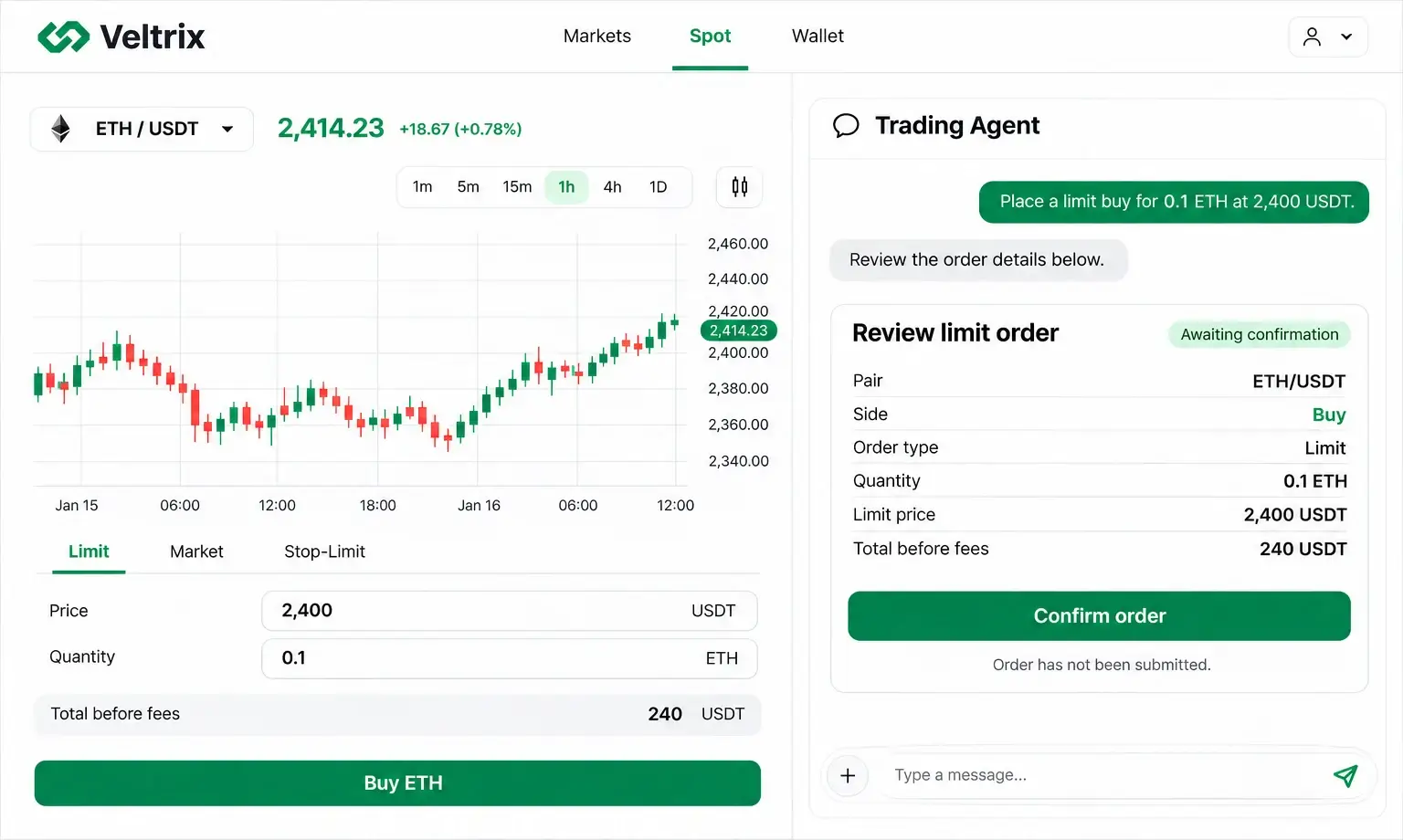
Those are the terms the user needs to see before confirming. If they reply “Make it 2,350,” show the new price and ask them to confirm the revised order. A question like “How much would that cost?” belongs on the information path.
At submission, the exchange checks the order against the current account and market rules. For example, the user may have spent some USDT in the regular trading interface since opening the chat. The exchange can reject the order if there are insufficient funds. It can also reject a price or quantity that falls outside the market’s allowed increments.
The chat reports the status returned by the API. If the exchange accepts the order and puts it on the order book, say that it’s open. If it fills in part, show how much was filled. A trader needs to know whether they bought ETH or still have an order waiting to execute.
How withdrawals and repeated requests were handled
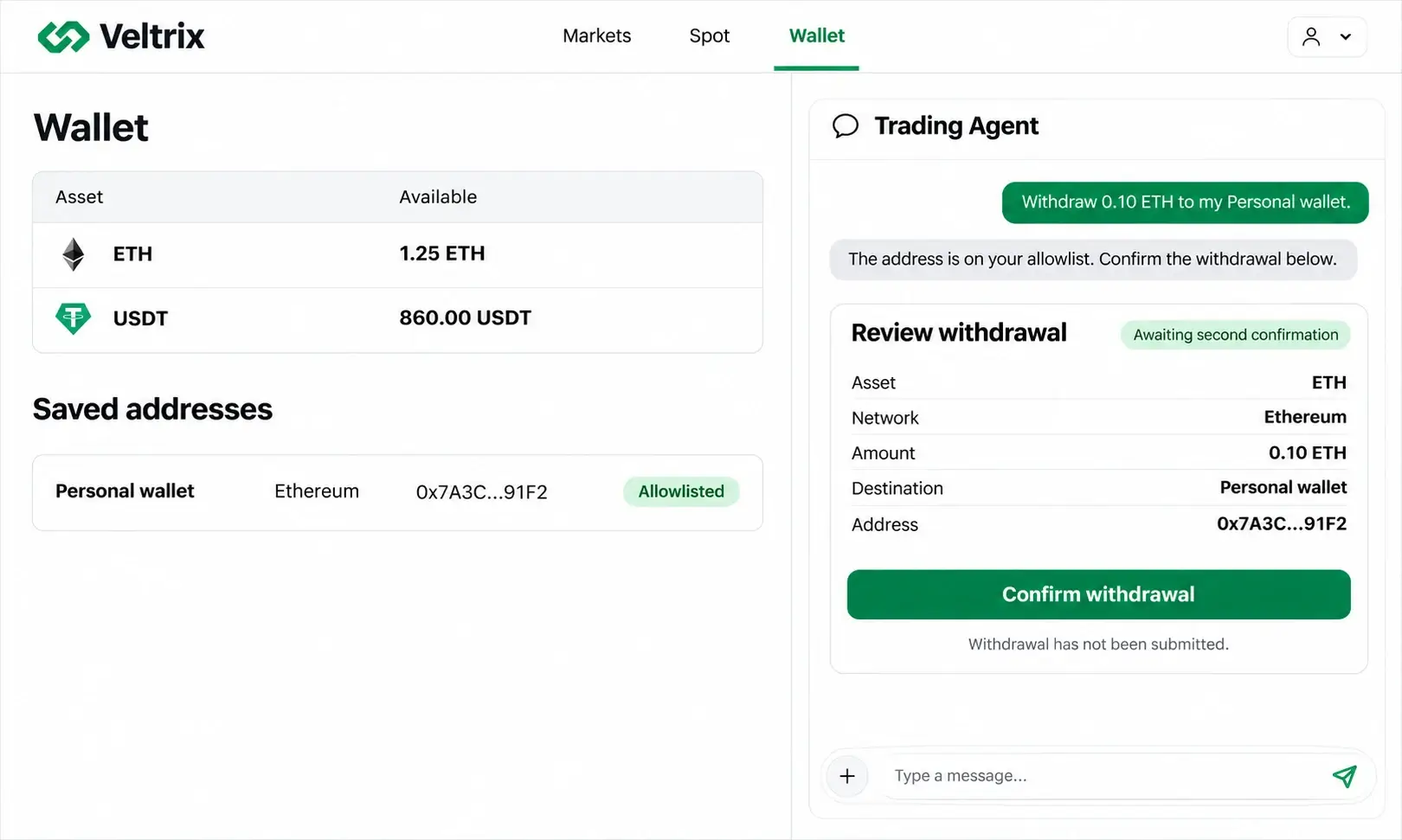
For withdrawals, the platform checked the destination against the account’s allowlist and asked for a second confirmation before calling the API. If a user referred to a recipient by name, the address on file was the one that mattered for authorization.
The trading integration used idempotency keys to guard against duplicate submissions. A repeated delivery of the same confirmed request uses the same key. A trader can still confirm a second order with identical terms as a separate operation.
A timeout illustrates why this matters. The exchange may accept an order and lose the response on its way back to the chat. In that situation, one approach is to tell the user the status is still being checked, then look up the order through the API. If the exchange supports a retry, use the original key. Submitting again with a new key can leave the user with two orders.
What to check in testing
Test what the agent understood and what the exchange actually received. An agent can correctly route a message to spot trading and still send the wrong quantity or pair.
| Example test | Expected behavior |
| “What happens if I sell 1 ETH?” | Answer the question without creating an order. |
| “Buy 100” | Ask which asset and what the amount is measured in. |
| The user changes the limit price after seeing the order preview. | Show the new price and ask for confirmation again. |
| The user spends their available balance after seeing the preview. | Check available funds at submission and show the rejection if the exchange declines the order. |
| The same confirmed request arrives twice. | Submit one order. |
| The withdrawal address is missing from the allowlist. | Block the request and explain why. |
What went live
The exchange added one chat interface for six types of requests. Users could look up their account activity or start a supported trading or wallet operation in the same conversation. The exchange API still determined what could go through and what status the user saw.
If you want to add chat to an existing exchange, tell us which workflow your users should be able to complete first. Explore AI chatbot development with Merehead.