
Check out these 14 tips to enhance your web design and make sure it’s doing all it can for your business and customers. We also recommend reading - TOP GRAPHIC DESIGN TRENDS IN 2022.
1. Simple design is effective design
With all the information and noise users have to sift through these days, simplicity in web design is the name of the game.
Simple color palettes, clean lines, and lots of negative space help visitors to process your website quickly and help them form an instantly positive impression of your business.
For more design inspiration have a look at ChennaiCreative.in website, which is a resource place for a plethora of design samples for you to choose from.
2. Provide clear navigation
Guiding users through your site through clever navigation design has become a complex discipline, with best practices forged through endless A/B testing by UX experts.
To make the most of your site’s navigation:
- Plan clear and logical paths to information or conversion points
- Use clear language, but don’t be afraid to get creative
- Ensure there’s a place for conversion on each page
3. Include plenty of Calls to Action
Calls-to-action design can go a lot further than the standard “Subscribe” style buttons. There are many examples of brands that get creative with the copy and design of their Calls-to-Action without subverting expectations so much that it discourages click-through.
People like to feel that a UX pathway feels familiar, so aim for a blend of using the expected web conventions with a twist.
4. Use microinteractions in your UX design
Microinteractions are a hot-button trend in UX/UI design these days. CTA’s and web navigation has become so run of the mill, that it’s getting increasingly difficult to find a way to stand out from the crowd.
Microinteractions are small animations on your UX elements to further grab the user’s attention. They also have the added benefit of adding a more “human” touch to the user experience.
5. Only use quality visuals
Having high-quality visuals on your website is a necessity, and studies have shown the positive effects in terms of brand impression and conversion rates.
Here are some quick tips for website visuals:
- Avoid awkward stock photos
- Choose imagery that reflects your brand values and target audience
- Use the latest trends in graphic design
- Include graphs, icons, and infographics
6. Include videos on your site
Video marketing is liberally used in social media and to promote businesses on third-party platforms, but it’s just as effective for driving engagement directly on your website.
Studies show that users stay on websites with videos significantly longer (as much as 60% longer!) than those with just imagery and text.

7. Use responsive design
We’re living in the age of mobile usage. As of 2020, mobile browsing accounts for 51.3% of all internet usage. Just imagine how much traffic your website is missing out on if it’s not structured to cater to mobile users.
Responsive design provides a seamless website experience for users across all points of contact.
8. Voice search optimization is key
By 2020, it’s estimated that 50% of Google searches will be through voice search. This doesn’t mean a significant change for web design, but it does mean a significant change for how content will be ranked in the search results.
For webmasters, marketers, SEO experts, or content creators, it means catering to specific search intent. Google’s algorithms are increasingly ranking content according to the value it provides to the end-user, so user intent is a core component to optimizing your site for voice search.
9. Make your site accessible
Accessibility in your web design is about ensuring you cater to all online users who may require different functionalities depending on their disability. If that’s not reason enough, just think about how many web users you’re missing out on by not ensuring your website is accessible for all.
Check out the different ways people with disabilities access the internet and how you can structure your website to make sure it’s compatible with these browsing techniques.

10. Make sure your site is capturing leads
Lead capture is especially important for websites in the B2B and e-commerce space, but all the websites should be designed to capture contact information for users.
Capturing lead information allows you to further market to those users and hopefully entice them down the sales funnel towards conversion.
Lead capture is usually done with forms, but it can be as simple as a single box email subscription.
11. Provide valuable content
These days, it’s all about producing quality content if you want your site to rank.
What does valuable content look like?
- It’s a well-researched topic that answers problems your target audience is seeking to solve
- It’s impeccably written
- It uses high-quality visuals and always aims to be easily digestible
12. Make support freely available
Your website should showcase all the ways customers can get in touch with your business. Hubspot’s website and support functions have perfected the design.
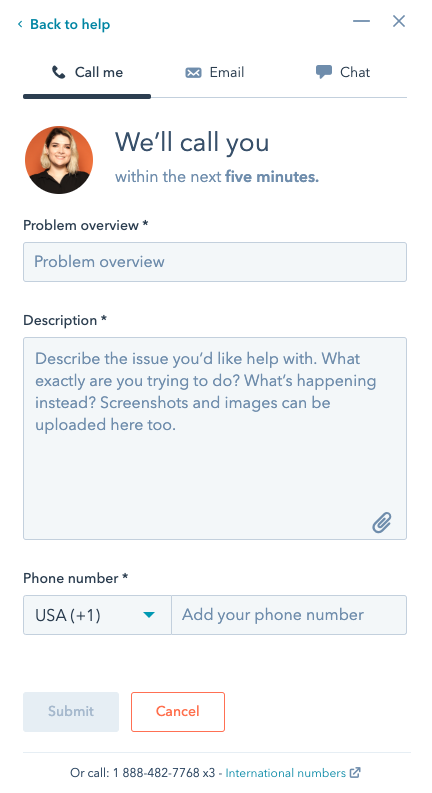
At any given time, users can see:
- How they can contact Hubspot
- Provide an outline of the problem they have encountered
- Will be given an estimated response time
Even if your chatbot is the only point of contact on your website, ensure it’s clearly visible and easy to use.
13. Build analytics into your site
Collecting and analyzing data should be an integral part of your website’s design.
These web analytics tools have easy integration features so you can incorporate them as part of your web design:
- Google Analytics.
- Hubspot.
- SEMRush.
- Moz.
- Clicktale.
- GoingUp.
14. Optimize for technical SEO
As part of your web design, technical SEO optimization for search engines includes:
- Using a Secure Sockets Layer (SSL).
- Optimizing site speed.
- Fixing duplicate pages/content.
- Ensuring the XML sitemap is up to date.
- Include structured data markup on your site.
These 14 tips will enhance your web design to attract visitors, guide them through your site, and convert them into loyal customers who love your website.